

OAuth2 Device Authorization Flow
How to Authenticate Headless Devices
What is this and why do I need it?
Most login flows assume you have a browser available: you visit a page, type your username and password, and you're done. But some devices — like smart home hubs, CLI tools, or IoT devices — don't have a browser or keyboard. That's where the Device Authorization Flow comes in.
Instead of logging in on the device itself, the flow works like this:
- The device asks the authorization server for a short code.
- You open a browser on any other device (your phone, laptop, etc.) and visit a short URL.
- You type the code and log in normally.
- Meanwhile, the device is quietly polling in the background until your login completes.
- Once you approve, the device receives an access token automatically.
This is the same pattern used by smart TVs asking you to "visit this URL to connect your account."
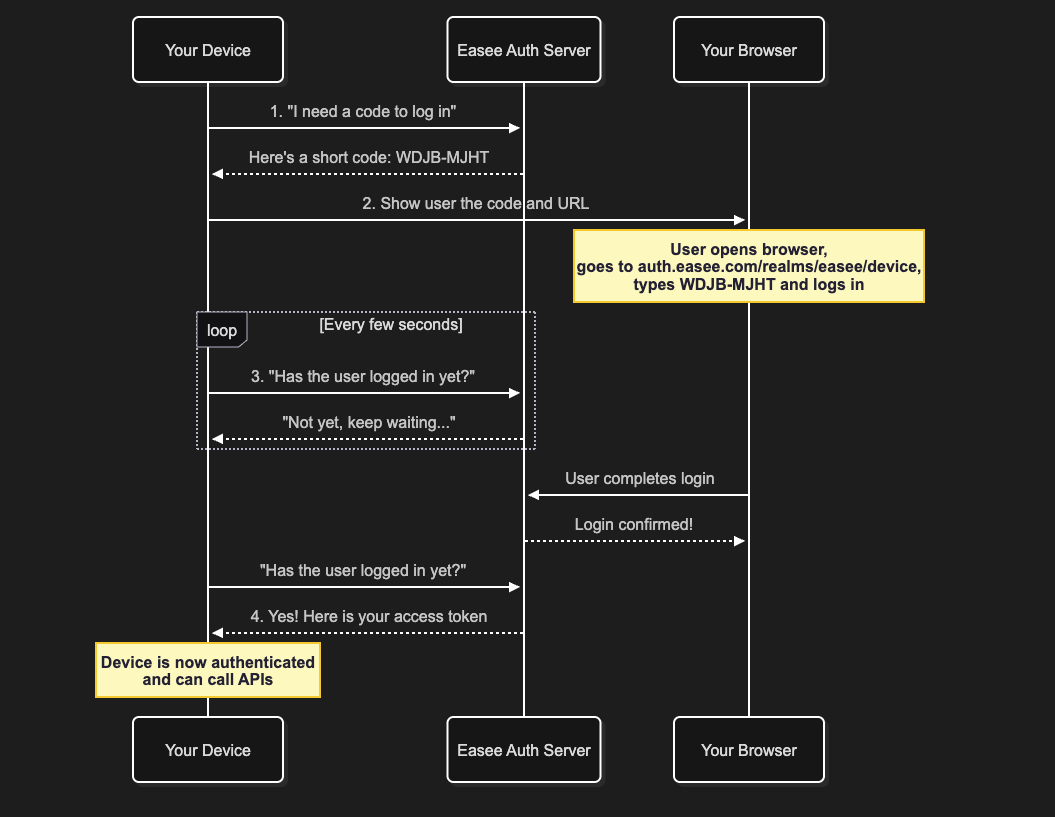
No client secret required.
The Device Authorization Flow is designed for environments where a secret cannot be kept safe: CLI tools, IoT devices, smart TVs, and embedded hardware. Anyone can read a secret stored on a device by inspecting its firmware or files, making the secret worthless as a security measure. For this reason, clients using this flow are always public clients and require only aclient_id— no secret.
Setup Details
| Setting | Value |
|---|---|
| Authorization server | https://auth.easee.com |
| Realm | easee |
| Base URL | https://auth.easee.com/realms/easee |
| Client ID | public-my-client |
About PKCE
PKCE (Proof Key for Code Exchange, pronounced "pixie") is a security extension that prevents a stolen authorization code from being exchanged for tokens by an attacker. It works by having the device generate a secret (code_verifier) before the flow starts, send a hashed version of it (code_challenge) with the initial request, and then prove it holds the original secret when redeeming the token. Since only the legitimate device ever knew the original value, anyone who intercepted the code cannot use it.
PKCE requires two extra values that the device generates locally:
| Value | What it is |
|---|---|
code_verifier | A random string (43–128 characters). Keep it secret on the device. |
code_challenge | BASE64URL(SHA256(code_verifier)). Send this to the server. |
The code_verifier is sent only once — when redeeming the token in Step 3.
Step-by-Step Walkthrough
Step 0: Generate the PKCE Values
Before making any requests, the device generates its PKCE pair:
# Generate a random code_verifier
CODE_VERIFIER=$(openssl rand -base64 32 | tr -d '=+/' | tr -dc 'A-Za-z0-9' | head -c 43)

# Derive the code_challenge from it
CODE_CHALLENGE=$(echo -n "$CODE_VERIFIER" | openssl dgst -sha256 -binary | openssl base64 | tr -d '=' | tr '+/' '-_')

echo "Verifier : $CODE_VERIFIER"
echo "Challenge: $CODE_CHALLENGE"
Step 1: Request a Device Code
The device makes a POST request to the device authorization endpoint, including the code_challenge:
Endpoint:
POST https://auth.easee.com/realms/easee/protocol/openid-connect/auth/devicecurl -X POST https://auth.easee.com/realms/easee/protocol/openid-connect/auth/device \
-d "client_id=public-my-client" \
-d "scope=openid offline_access" \
-d "code_challenge=$CODE_CHALLENGE" \
-d "code_challenge_method=S256"Why
offline_access? Devices are often left running unattended for long periods. Theoffline_accessscope issues a refresh token that is not bound by the session's maximum lifespan, and remains valid much longer than a standard refresh token. This means the device can keep renewing its access token silently in the background without ever asking the user to log in again.
Example response:
{
  "device_code": "Ag_EE...long_opaque_string",
  "user_code": "WDJB-MJHT",
  "verification_uri": "https://auth.easee.com/realms/easee/device",
  "verification_uri_complete": "https://auth.easee.com/realms/easee/device?user_code=WDJB-MJHT",
  "expires_in": 600,
  "interval": 5
}| Field | Meaning |
|---|---|
device_code | Secret token used by the device when polling. Never show this to the user. |
user_code | The short code the user types in the browser. Show this to the user. |
verification_uri | The URL where the user goes to enter the code. |
verification_uri_complete | A convenience URL with the code pre-filled (useful for QR codes). |
expires_in | Seconds until this code expires (typically 10 minutes). |
interval | Minimum seconds to wait between polling attempts. |
Step 2: Show the Code to the User
Display the user_code and verification_uri to whoever is using the device:
To authorize this device, please:

  1. Open a browser and go to: https://auth.easee.com/realms/easee/device
  2. Enter the code: WDJB-MJHT

The code expires in 10 minutes.
The user then opens the URL on any browser, enters the code, and logs in with their Easee credentials.
Step 3: Poll for the Token
While the user completes the login, the device repeatedly polls the token endpoint using the device_code and the original code_verifier. It must wait at least interval seconds between each attempt.
Endpoint:
POST https://auth.easee.com/realms/easee/protocol/openid-connect/tokencurl -X POST https://auth.easee.com/realms/easee/protocol/openid-connect/token \
-d "grant_type=urn:ietf:params:oauth:grant-type:device_code" \
-d "device_code=Ag_EE...long_opaque_string" \
-d "client_id=public-my-client" \
-d "code_verifier=$CODE_VERIFIER"While the user has not yet completed login, the server responds with:
{
  "error": "authorization_pending",
  "error_description": "The authorization request is still pending"
}
This is normal. Keep polling at the specified interval.
If you poll too fast, you'll get:
{
  "error": "slow_down"
}
Increase your wait interval by at least 5 seconds when you receive this.
Once the user completes login, the server responds with the tokens:
{
  "access_token": "eyJhbGci...very_long_jwt",
  "expires_in": 300,
  "refresh_expires_in": 1800,
  "refresh_token": "eyJhbGci...another_long_jwt",
  "token_type": "Bearer",
  "id_token": "eyJhbGci...yet_another_jwt",
  "scope": "openid offline_access"
}
Step 4: Use the Access Token
Include the access_token in the Authorization header of any API request:
curl https://your-api.easee.com/some/endpoint \
  -H "Authorization: Bearer eyJhbGci...very_long_jwt"
Step 5: Refresh the Token (Optional)
Access tokens are short-lived. Use the refresh_token to get a new one without asking the user to log in again:
curl -X POST https://auth.easee.com/realms/easee/protocol/openid-connect/token \
  -d "grant_type=refresh_token" \
  -d "client_id=public-my-client" \
  -d "refresh_token=eyJhbGci...refresh_token_value"
Common Errors
| Error | Meaning | Action |
|---|---|---|
authorization_pending | User hasn't completed login yet | Keep polling |
slow_down | Polling too fast | Wait longer between polls |
expired_token | User took too long (>10 min) | Start over from Step 1 |
access_denied | User denied the request | Stop and inform the user |
Full End-to-End with cURL
Here is the complete sequence as a shell script:
#!/bin/bash

CLIENT_ID="public-my-client"
BASE_URL="https://auth.easee.com/realms/easee/protocol/openid-connect"

# Step 0: Generate PKCE values
CODE_VERIFIER=$(openssl rand -base64 32 | tr -d '=+/' | tr -dc 'A-Za-z0-9' | head -c 43)
CODE_CHALLENGE=$(echo -n "$CODE_VERIFIER" | openssl dgst -sha256 -binary | openssl base64 | tr -d '=' | tr '+/' '-_')

# Step 1: Request device code
RESPONSE=$(curl -s -X POST "${BASE_URL}/auth/device" \
  -d "client_id=${CLIENT_ID}" \
  -d "scope=openid offline_access" \
  -d "code_challenge=${CODE_CHALLENGE}" \
  -d "code_challenge_method=S256")

DEVICE_CODE=$(echo "$RESPONSE" | python3 -c "import sys,json; print(json.load(sys.stdin)['device_code'])")
USER_CODE=$(echo "$RESPONSE"   | python3 -c "import sys,json; print(json.load(sys.stdin)['user_code'])")
VERIFY_URI=$(echo "$RESPONSE"  | python3 -c "import sys,json; print(json.load(sys.stdin)['verification_uri'])")
INTERVAL=$(echo "$RESPONSE"    | python3 -c "import sys,json; print(json.load(sys.stdin)['interval'])")

# Step 2: Show instructions to user
echo ""
echo "  Open your browser and go to: ${VERIFY_URI}"
echo "  Enter the code: $USER_CODE"
echo ""

# Step 3: Poll until the user completes login
while true; do
  sleep "$INTERVAL"
  TOKEN_RESPONSE=$(curl -s -X POST "${BASE_URL}/token" \
    -d "grant_type=urn:ietf:params:oauth:grant-type:device_code" \
    -d "device_code=${DEVICE_CODE}" \
    -d "client_id=${CLIENT_ID}" \
    -d "code_verifier=${CODE_VERIFIER}")

  ERROR=$(echo "$TOKEN_RESPONSE" | python3 -c "import sys,json; d=json.load(sys.stdin); print(d.get('error',''))")

  if [ "$ERROR" = "authorization_pending" ]; then
    echo "Waiting for user to complete login..."
  elif [ "$ERROR" = "slow_down" ]; then
    INTERVAL=$((INTERVAL + 5))
    echo "Slowing down polling interval to ${INTERVAL}s..."
  elif [ -z "$ERROR" ]; then
    ACCESS_TOKEN=$(echo "$TOKEN_RESPONSE" | python3 -c "import sys,json; print(json.load(sys.stdin)['access_token'])")
    echo ""
    echo "Login successful!"
    echo "Access token: ${ACCESS_TOKEN:0:40}..."
    break
  else
    echo "Error: $ERROR"
    exit 1
  fi
done
Python Script
Save the following as device_flow.py and run it with:
python3 device_flow.pyor passing your client ID explicitly:
python3 device_flow.py --client-id public-my-client#!/usr/bin/env python3
"""
Device Authorization Flow demo for Keycloak (auth.easee.com / realm: easee).
Usage:
python3 device_flow.py --client-id <id>
"""
import argparse
import hashlib
import base64
import os
import sys
import time
import urllib.request
import urllib.parse
import urllib.error
import json
BASE_URL = "https://auth.easee.com/realms/easee/protocol/openid-connect"
DEVICE_ENDPOINT = f"{BASE_URL}/auth/device"
TOKEN_ENDPOINT = f"{BASE_URL}/token"
def generate_pkce():
verifier = base64.urlsafe_b64encode(os.urandom(32)).rstrip(b"=").decode()
digest = hashlib.sha256(verifier.encode()).digest()
challenge = base64.urlsafe_b64encode(digest).rstrip(b"=").decode()
return verifier, challenge
def post(url: str, data: dict) -> dict:
payload = urllib.parse.urlencode(data).encode()
req = urllib.request.Request(url, data=payload, method="POST")
with urllib.request.urlopen(req) as resp:
return json.loads(resp.read())
def request_device_code(client_id: str, code_challenge: str) -> dict:
return post(DEVICE_ENDPOINT, {
"client_id": client_id,
"scope": "openid offline_access",
"code_challenge": code_challenge,
"code_challenge_method": "S256",
})
def poll_for_token(client_id: str, device_code: str, code_verifier: str, interval: int) -> dict:
data = {
"grant_type": "urn:ietf:params:oauth:grant-type:device_code",
"device_code": device_code,
"client_id": client_id,
"code_verifier": code_verifier,
}
while True:
time.sleep(interval)
try:
response = post(TOKEN_ENDPOINT, data)
except urllib.error.HTTPError as e:
response = json.loads(e.read())
error = response.get("error")
if not error:
return response
elif error == "authorization_pending":
print(" Waiting for you to complete login in the browser...")
elif error == "slow_down":
interval += 5
print(f" Server asked to slow down. New interval: {interval}s")
elif error == "expired_token":
print("\nThe code has expired. Please run the script again.")
sys.exit(1)
elif error == "access_denied":
print("\nLogin was denied by the user.")
sys.exit(1)
else:
print(f"\nUnexpected error: {error} - {response.get('error_description')}")
sys.exit(1)
def main():
parser = argparse.ArgumentParser(description="Device Authorization Flow demo")
parser.add_argument("--client-id", default="public-my-client", help="OAuth client ID")
args = parser.parse_args()
print(f"\nUsing client ID: {args.client_id}\n")
# Step 0: Generate PKCE pair
code_verifier, code_challenge = generate_pkce()
# Step 1: Get device code
print("Requesting device code...")
device_resp = request_device_code(args.client_id, code_challenge)
device_code = device_resp["device_code"]
user_code = device_resp["user_code"]
verify_uri = device_resp["verification_uri"]
expires_in = device_resp["expires_in"]
interval = device_resp["interval"]
# Step 2: Show instructions
print("\n" + "=" * 60)
print(" ACTION REQUIRED")
print("=" * 60)
print(f" 1. Open this URL in your browser:\n {verify_uri}")
print(f" 2. Enter this code when prompted:\n USER_CODE")
print(f"\n Code expires in {expires_in // 60} minutes.")
print("=" * 60 + "\n")
# Step 3: Poll
print("Polling for token (this runs automatically)...")
token_resp = poll_for_token(args.client_id, device_code, code_verifier, interval)
# Step 4: Done
access_token = token_resp["access_token"]
refresh_token = token_resp.get("refresh_token", "N/A")
expires = token_resp.get("expires_in", "?")
print("\n" + "=" * 60)
print(" LOGIN SUCCESSFUL")
print("=" * 60)
print(f" Access token (expires in {expires}s):")
print(f" {access_token[:60]}...")
print(f"\n Refresh token:")
print(f" {refresh_token[:60]}...")
print("=" * 60)
output = {
"access_token": access_token,
"refresh_token": refresh_token,
"expires_in": expires,
"token_type": token_resp.get("token_type"),
}
with open("tokens.json", "w") as f:
json.dump(output, f, indent=2)
print("\nFull token response saved to tokens.json")
if __name__ == "__main__":
main()Quick Reference: All Endpoints
| Purpose | Method | URL |
|---|---|---|
| OpenID discovery | GET | https://auth.easee.com/realms/easee/.well-known/openid-configuration |
| Request device code | POST | https://auth.easee.com/realms/easee/protocol/openid-connect/auth/device |
| Poll for token | POST | https://auth.easee.com/realms/easee/protocol/openid-connect/token |
| Refresh token | POST | https://auth.easee.com/realms/easee/protocol/openid-connect/token |
| User login page (browser) | GET | https://auth.easee.com/realms/easee/device |
Updated about 9 hours ago